
For every trade that rolls a truck
Run the whole shop from one board.
Book the call, dispatch the truck, quote from your pricebook and get paid on site. FieldRock gives a five-truck shop the tools the big operators run on.
FieldRock is invite-only for now.
- Office
- Dispatch, quotes, invoices
- Field app
- iPhone & Android
- Calendar
- Google Calendar sync
- Accounts
- By invitation
Every trade
Set up for your work from the first login.
An account starts with its trade’s job types, a starter pricebook and a maintenance plan — so the first job you book looks like your business, not somebody else’s. Run more than one trade? Add the rest yourself; nothing is locked to one.
- HVACSeasonal tune-ups, no-cool calls and changeouts, with the maintenance agreements that fill the slow months.5 job types · 12 pricebook items
- PlumbingDrain calls, water heaters and leak repairs, priced from your book before you leave the driveway.5 job types · 12 pricebook items
- ElectricalPanel upgrades, EV chargers and troubleshooting, with good / better / best options on every quote.5 job types · 11 pricebook items
- RoofingInspections, leak repairs and replacements, from a quick measure to a signed good / better / best quote.5 job types · 9 pricebook items
- Landscaping & LawnRecurring mowing routes, seasonal cleanups and installs, with crews on the board every day of the week.5 job types · 9 pricebook items
- Pest ControlQuarterly service routes, one-off treatments and inspections, with the recurring plans your revenue rides on.5 job types · 7 pricebook items
- CleaningRecurring home and office cleans, deep cleans and move-outs, with every crew’s day on one board.4 job types · 8 pricebook items
- Garage DoorsSpring and opener repairs, new door installs and tune-ups, quoted on site and paid before you pull away.4 job types · 9 pricebook items
- Pool & SpaWeekly service routes, equipment repairs and openings and closings, all from the truck.4 job types · 8 pricebook items
- Handyman & GeneralA little of everything: small repairs, installs and punch lists, booked, dispatched and invoiced the same way.4 job types · 8 pricebook items
Dispatch
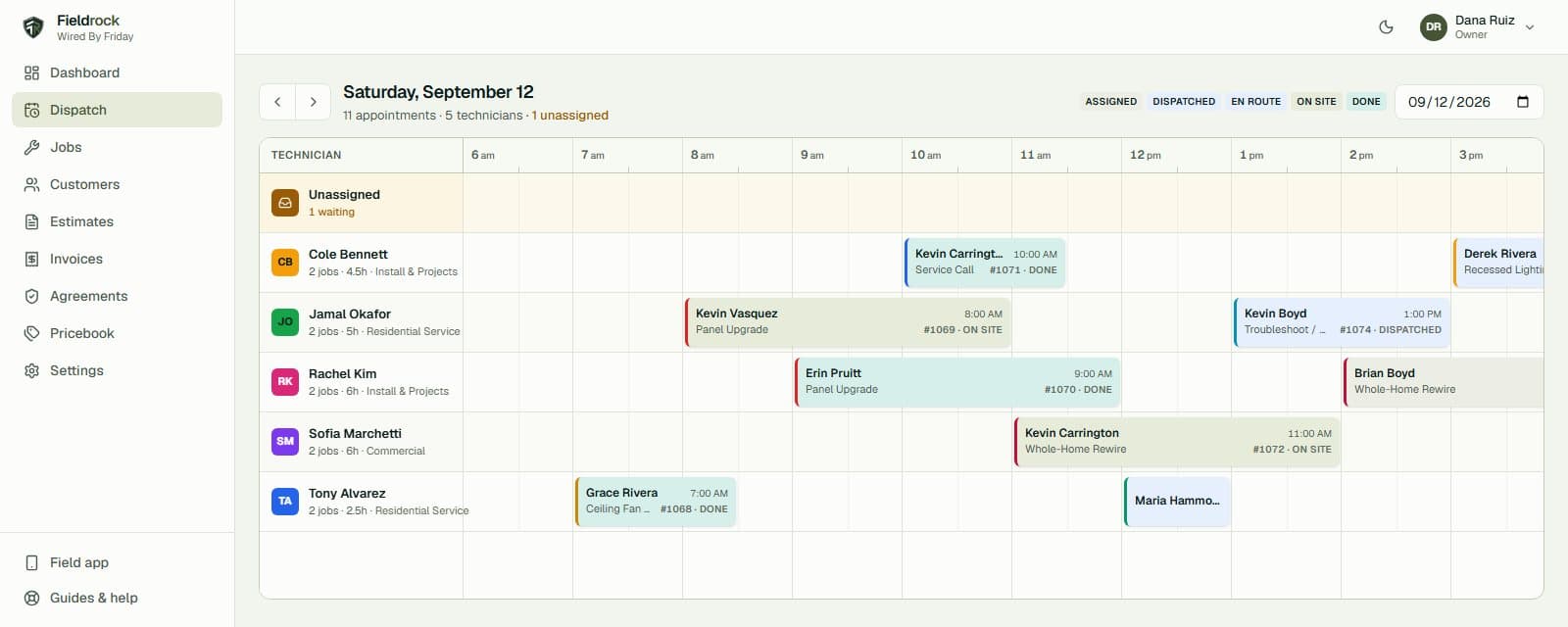
The whole day on one board.
Every technician is a row and the day runs left to right. Drag a job to a different truck or a later slot and it snaps to the quarter hour and saves. Unassigned calls wait in their own lane at the top until someone claims them, and the red line shows where the day has got to.
- Drag to reassign or reschedule
- Status straight from each technician’s phone
- Unassigned lane for triage
Estimates → invoices
Quote from the book. Get paid on the spot.
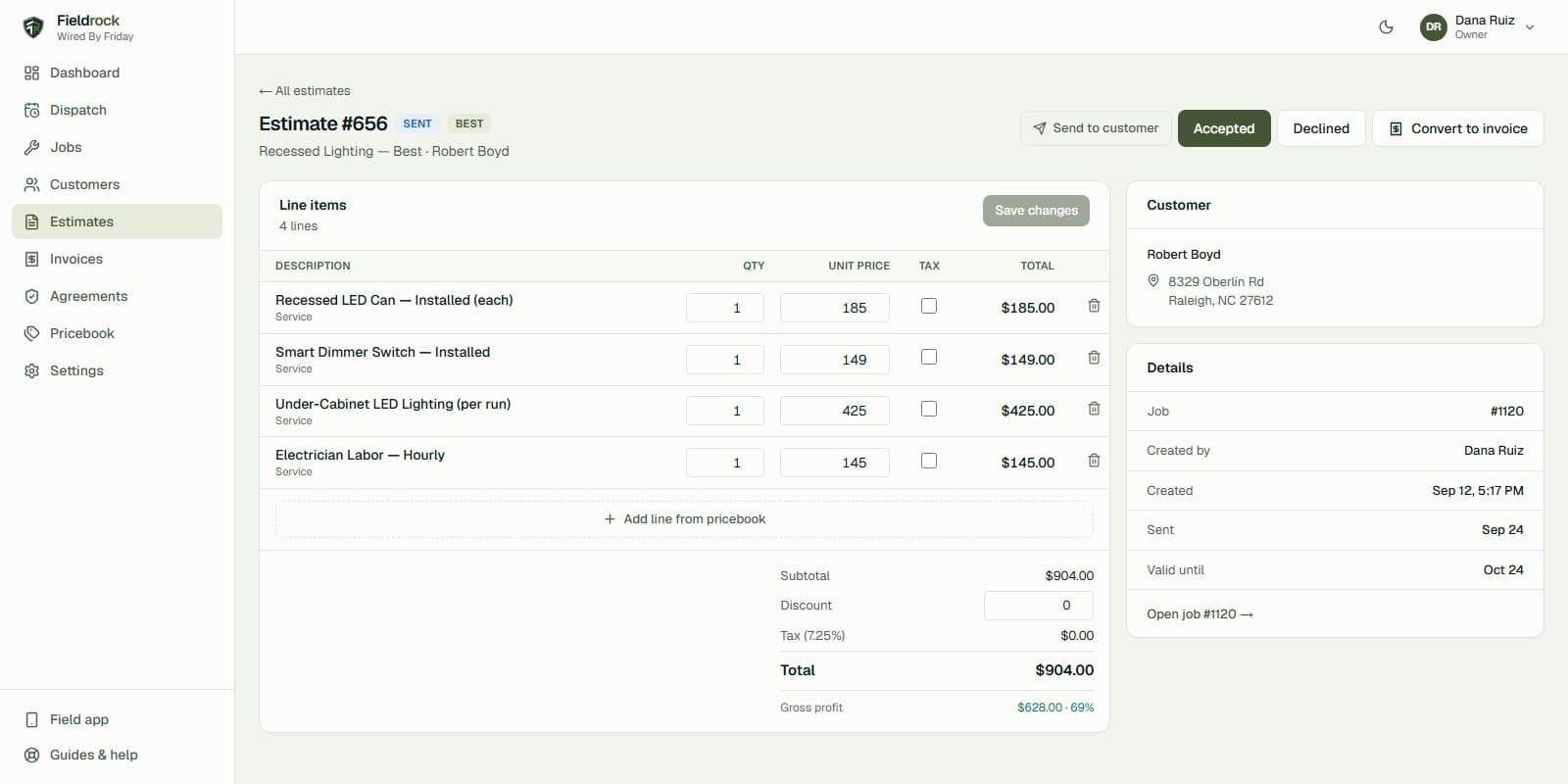
Build good, better and best options from your own pricebook with your margin showing as you go. Send the customer a link, they approve on their phone, and it converts to an invoice they can pay by card before you have packed up.
- Good / better / best options
- Live gross-profit readout
- Card payment by link — no card data on our servers
Maintenance agreements
Recurring revenue that actually recurs.
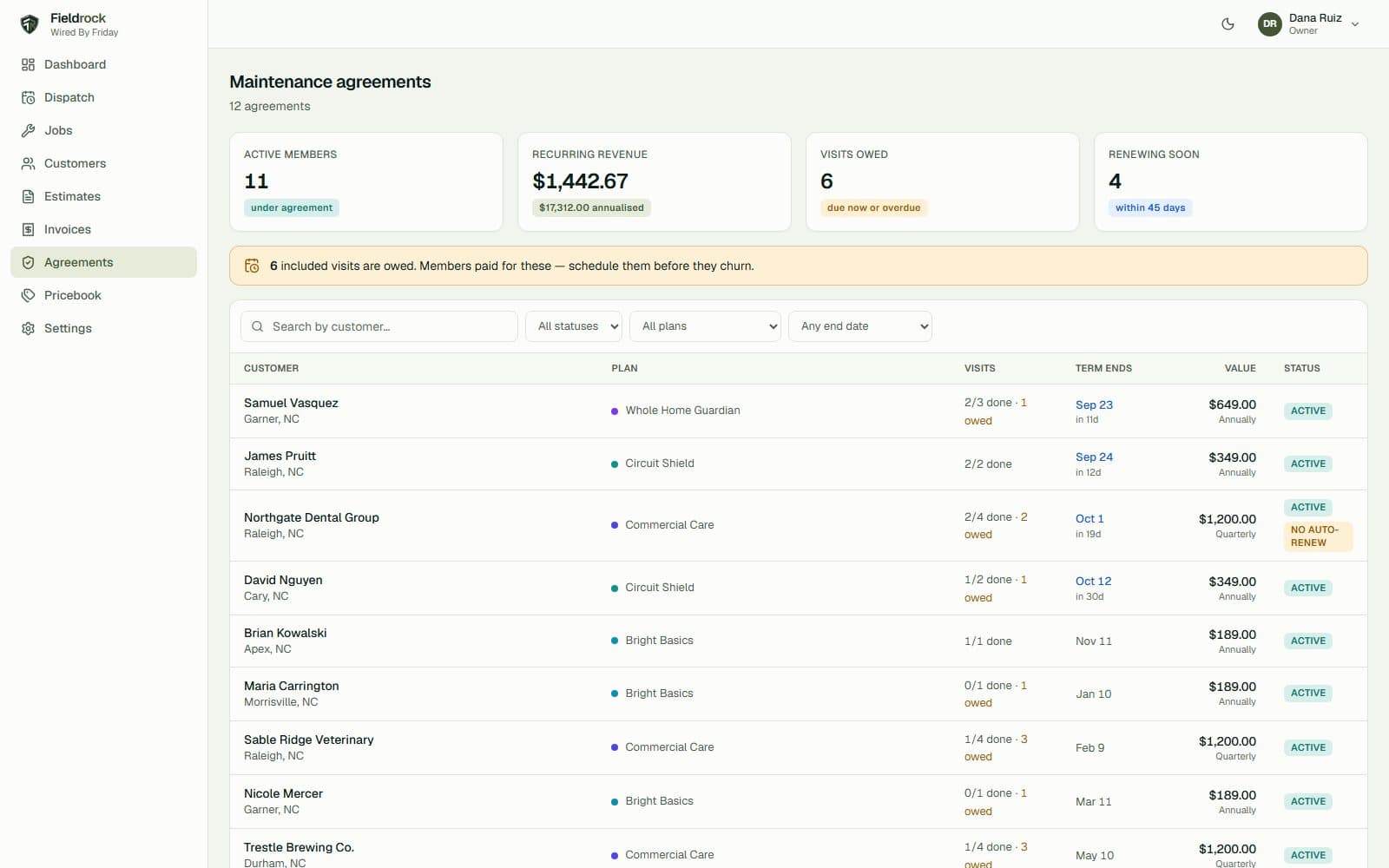
Sell a plan, and every visit it includes is laid out across the term, ready to turn into a job in one click. Members get their discount taken off automatically. The agreements page leads with the visits you owe and the renewals coming up, because those are the ones that cost you when they slip.
- Included visits scheduled for you
- Member discounts applied at invoicing
- Renewals and lapsed members surfaced
Field app
Built for the driveway, not the desk.
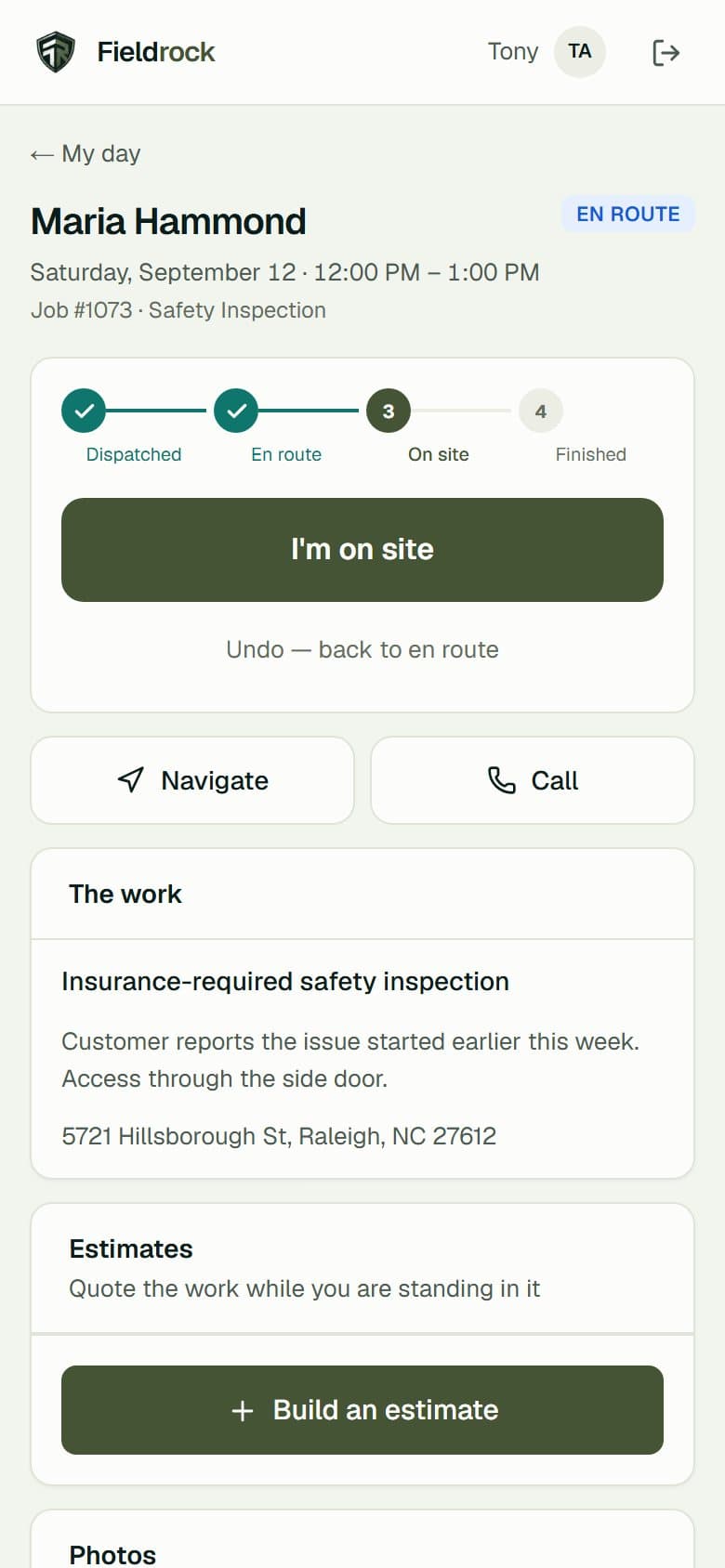
Technicians install it from the browser in ten seconds — no app store, no IT. Their day, one-tap directions and calling, gate codes, photos and notes, and three big buttons: on my way, on site, finished. Every tap is timestamped and shows on the board and the job record.
- Status
- One tap
- Photos
- From the camera
- Weak signal
- Last day stays readable
Works with Google Calendar
Your visits, on your own calendar.
Anyone on the team can connect their Google Calendar. FieldRock then adds each visit they are assigned to as an event — the customer, the address, the arrival window — moves it when the visit moves, and removes it when the visit is cancelled. That is all it does: it does not read the rest of your calendar, and disconnecting takes FieldRock’s events back off it. How FieldRock uses Google data.
Starter packet
Up and running by lunch.
Short videos for every part of the shop, each with the steps written out. Watch one, do it in the other tab.
- 01Set up your companyCompany details, tax rate, and adding your team with the right roles.4 min · Owner
- 02Book a jobTake a call, find or add the customer, and put the job on the schedule.3 min · Office
- 03Run the dispatch boardSee the whole day at once, move work between technicians, and track every truck.3 min · Office
- 04Quote it, invoice it, get paidBuild an estimate from your pricebook, turn it into an invoice, and collect by card.5 min · Office
- 05Sell maintenance agreementsRecurring revenue: sell a plan, schedule the visits it includes, and give members their discount.4 min · Owner · Pro
- 06The field app for techniciansInstall it on a phone, work the day’s route, and update every job from the driveway.3 min · Technician
Does FieldRock work for my trade?
If you send people out to do work at a customer’s address, yes. Signup has starter kits for HVAC, plumbing, electrical, roofing, landscaping & lawn, pest control, cleaning, garage doors, pool & spa and handyman & general, each with its own job types, pricebook and maintenance plan. Anything else starts from the general kit, and every job type, price and plan is yours to rename and change.
How long does it take to get running?
Most of a morning. A new account comes with job types, a starter pricebook and a maintenance plan for your trade, so you can book a real job within minutes. The starter guides walk through setting up your team, dispatch, estimates and invoicing, each in about five minutes.
Can I import my customers from my old software?
Yes. Export your customer list as a CSV from your old software or a spreadsheet, then use Customers → Import. Columns like name, email, phone and address are matched automatically, you check the match and a preview before anything is saved, and anyone who is already a customer (same email or phone) is skipped. Up to 10,000 rows at a time. Jobs, estimates and your pricebook import the same way, from Jobs, Estimates and Pricebook; invoice and payment history are not imported.
Does it connect to QuickBooks?
Not yet. Invoices, payments and your A/R total are all in FieldRock and can be read off for your bookkeeper, but there is no automatic sync with an accounting package today.
Already on FieldRock?
Sign in to your company’s account. New companies join by invitation for now.